How Moveworks Works
Since ServiceNow acquired Moveworks, I wanted to understand Moveworks Agent Studio from a ServiceNow architect’s perspective. My goal was to build a simple mental model and compare it with familiar Flow Designer concepts.
This is based on the Moveworks Agent Studio Developer Fundamentals course, not hands-on building (there is no PDI-like environment yet). It is not a deep technical guide, but my current view of the main building blocks and how they fit together.
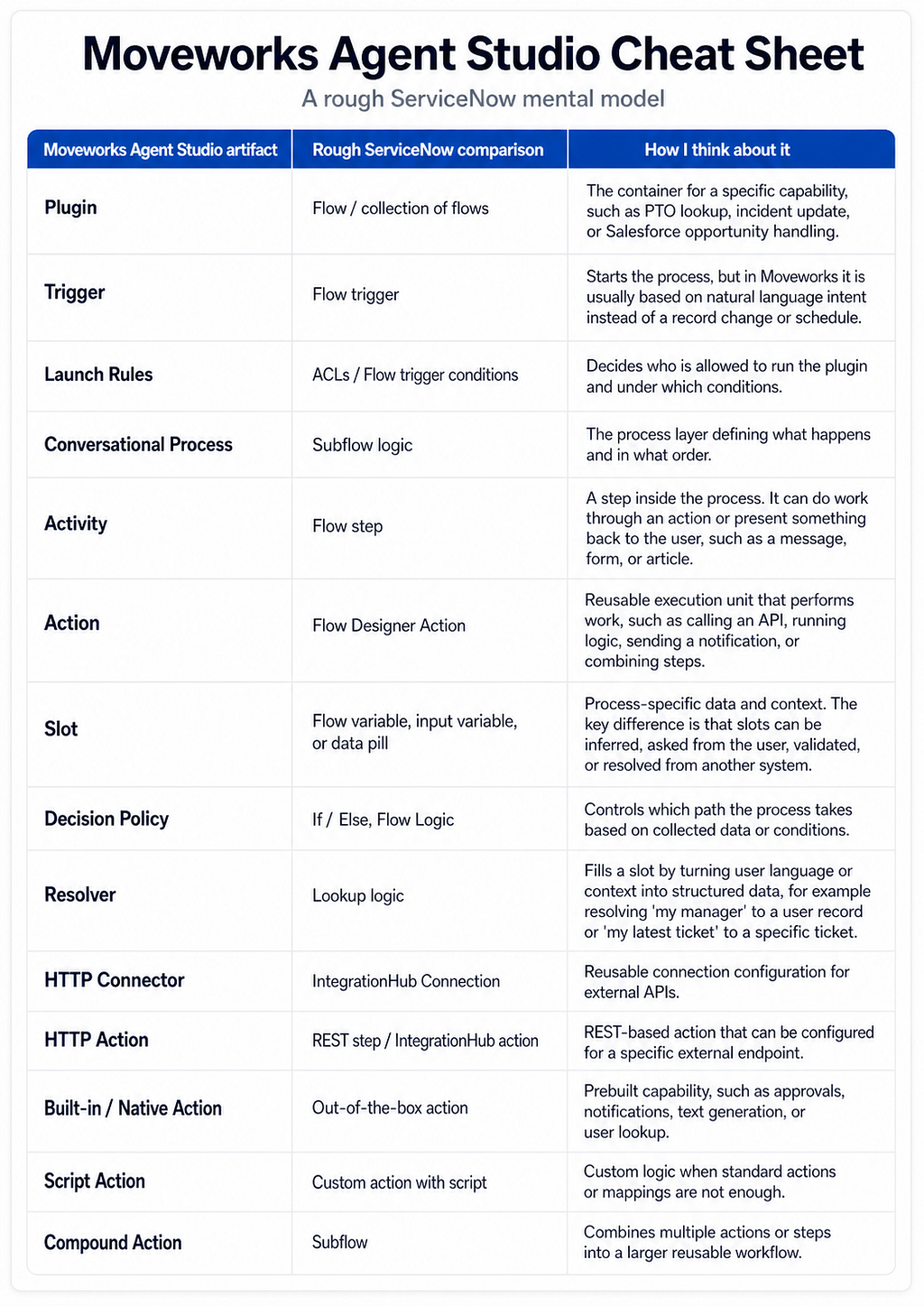
At the end, I put together a cheat sheet that maps every Agent Studio artifact to its closest ServiceNow equivalent. But first, the mental model that got me there.
The Agent Studio mental model
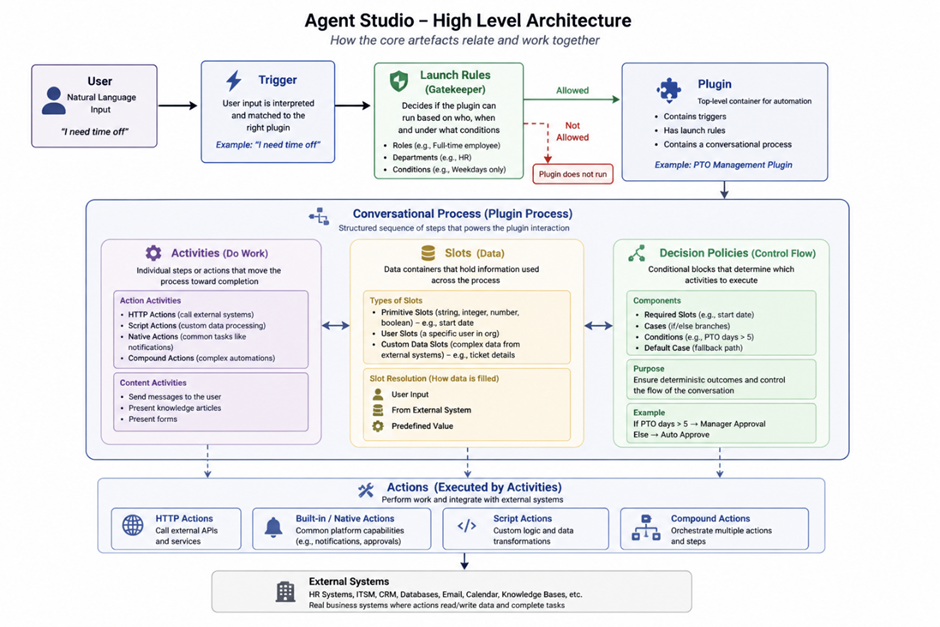
The diagram below shows the main artifacts I took away from the Moveworks Agent Studio Developer Fundamentals course and how they interact with each other.
At the center is the plugin. You can think of a plugin as the container for a specific agent-like capability. Some plugins are available as reusable templates from the marketplace, but you can also build your own.
A plugin is started by a trigger. In the course, this was explained as natural language input from the user. For example, a ServiceNow incident plugin, a Salesforce opportunity plugin, or a PTO plugin would each be triggered by different user intents or natural language utterances. The user does not need to know a command. They just ask for what they need, and Moveworks tries to match that request to the right plugin.
Before the plugin actually runs, launch rules act as the security and access layer. They define who is allowed to trigger the plugin and under which conditions. For example, a plugin could be available only to HR, only to IT managers, or only to selected users during testing.
The main part: the conversational process
The most important part of the plugin is the conversational process.
This is where the actual automation logic lives. Inside the conversational process, there are three core building blocks:
- Activities define what the assistant does.
- Slots define what information the assistant needs.
- Decision policies define which path the process should take.
The activities and decision policies feel relatively familiar from other low-code tools. Activities are the steps that either do something in a system or present something back to the user. Decision policies are basically the branching logic that decides which path to take.
The interesting part is that activities can be both action-oriented and conversation-oriented. An activity might call an API, run a script, or trigger a built-in action. But it might also send a message, show a form, or present content to the user.
For me, the bigger difference is still the separation between slots and activities.
This is probably the biggest mindset shift for anyone coming from ServiceNow. In the simplest form, slots are structured inputs the process needs before it can run certain activities. They are stored in the process context and can be reused later, similar to flow variables or data pills in ServiceNow.
But slots are more conversation-aware. Moveworks can infer them from the user’s message, ask the user for missing information, validate the value, or resolve it from another system. In the course, this was explained through slot resolution: values can come from the user, predefined values, or external systems.
So the process is not only saying: “Run this action.”
It is also asking:
- What data do I need before I can run it?
- Can I infer it from the conversation?
- Do I need to ask the user?
- Do I need to resolve it from another system?
This is the key difference I would highlight for anyone coming from a more traditional low-code automation background.
Actions and external systems
Under the conversational process sits the execution layer: actions.
Think of it this way: the activity says “now look up the user’s manager.” The action is the actual REST call that does it. Activities live inside the conversational process and define what should happen. Actions are the reusable execution units that do the work against Moveworks or external systems like ServiceNow, Salesforce, or Jira. In ServiceNow terms, actions are closest to Flow Designer actions.
Based on the course, these actions can include HTTP actions, built-in/native actions, script actions, and compound actions.
ServiceNow / Moveworks mental model cheat
To close this out, I tried to translate the Agent Studio artifacts into a ServiceNow mental model.
This is not a 1:1 mapping, and it is also not something that was shown like this in the course. It is simply the model I built for myself while learning Agent Studio from a ServiceNow background.
I hope it helps others who work with ServiceNow and want a faster way to understand how the Moveworks building blocks relate to concepts they already know.